


MODULE

Forms Module — Digital SOPs, Audits, and Gemba Walks with Built-In Action

Build, version, and deploy digital forms — audit checklists, Gemba walk templates, SOP confirmations — with scoring, photo capture, and direct task creation from findings.

Built for CI Managers and Quality teams who need audit and inspection data that connects directly to corrective action, not binders that collect dust.


The Problem This Solves

Findings Without Follow-Through Are Just Paper

Your plant conducts audits, Gemba walks, and SOP checks. The findings end up on paper forms that live in binders or spreadsheets that live on shared drives. There is no connection between a finding and a corrective action. When the same issue appears again three months later, no one can trace what happened last time. Version control does not exist — teams may be using outdated forms without knowing it.

The compliance evidence chain breaks at every step. An auditor identifies a non-conformance during a layered process audit, writes it on a paper form, and hands it to the area supervisor. The supervisor may or may not create a corrective action. If they do, it lives in a separate system — or no system at all. Three months later, the same finding appears, and the cycle repeats. Without a connected trail from finding to action to resolution, audit data generates effort but not improvement.


seven construction workers standing on white field

Why This Matters

Manufacturing plants typically conduct 50 to 200 formal audits and inspections per month — layered process audits, 5S audits, safety walks, Gemba observations, SOP verifications. When findings from these activities are not connected to corrective action in a structured way, the audit program becomes a documentation exercise rather than an improvement engine. Industry data suggests that fewer than 30% of audit findings result in completed corrective actions when managed through paper or disconnected digital tools. The audit itself becomes a compliance checkbox rather than a mechanism for operational improvement.

How It Works

From Form to Finding to Action — In One System

Drag-and-Drop Form Builder

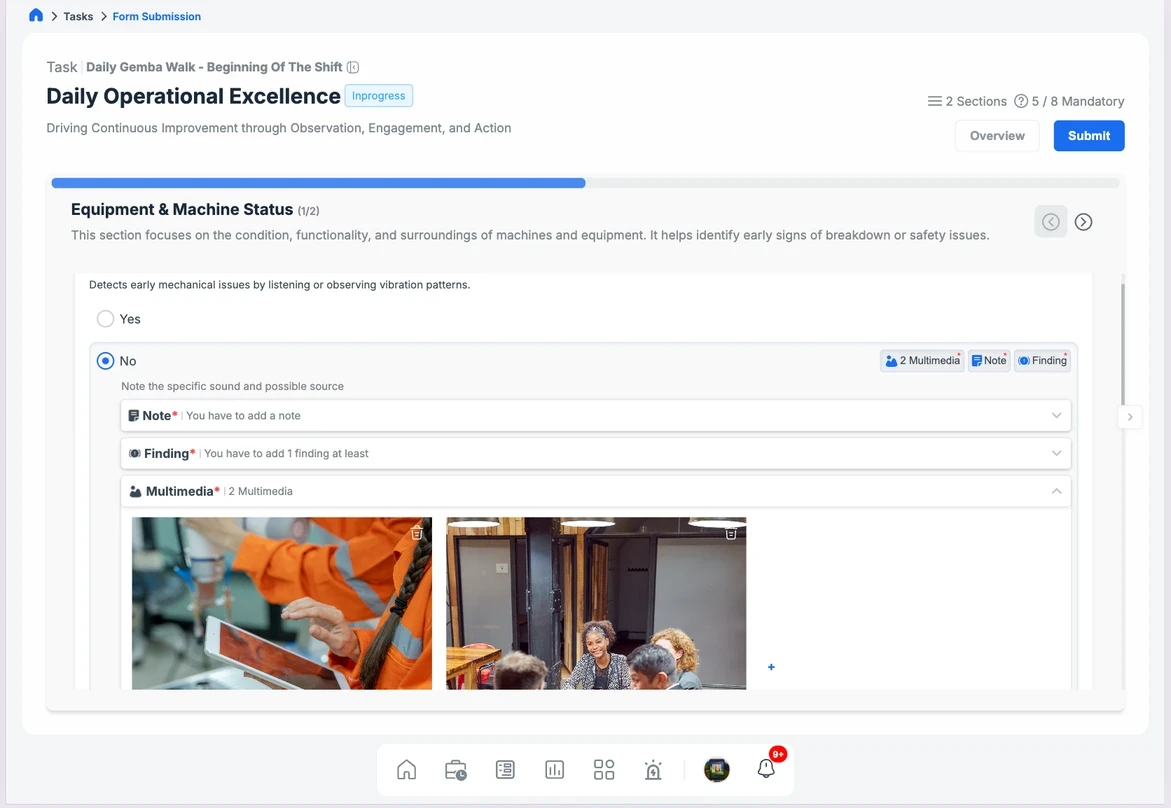
Create any form your plant needs: 5S audits, layered process audits, Gemba walk checklists, SOP confirmations, safety inspection templates. No coding. No IT tickets. CI and Quality teams build and modify their own forms. The builder supports multiple question types — yes/no, scoring scales, free text, photo capture, dropdown selections — allowing teams to design forms that match their audit methodology precisely. Audit scoring criteria are embedded in the form, not applied after the fact.

Direct Task Creation from Findings

When an auditor identifies a non-conformance or improvement opportunity, they create a task directly from the form — with photos, notes, and context attached. The finding and the action are linked from the start. This is the mechanism that converts audit effort into operational improvement. The task inherits the form context — audit type, location, score impact — so the assignee understands not just what to fix, but why it matters and how it was identified.

Version Control

Every form has a version history. When a form is updated, previous versions are archived, and teams are automatically moved to the current version. No risk of outdated checklists circulating on the floor. Version control also maintains a compliance evidence chain — auditors can see which version of a form was used for any historical submission, which is critical for ISO and IATF audit traceability. When regulatory requirements change, the updated form deploys immediately across the organization.

Photo Capture and Offline Capability

apture photo evidence during inspections directly within the form. Forms work offline on the shop floor and sync when connectivity returns — no data loss, no workarounds. In manufacturing environments where Wi-Fi coverage is inconsistent, offline capability is not a convenience — it is a requirement. Photos serve as objective evidence for findings, eliminating the subjectivity that undermines paper-based audit programs.

Scoring Engine

Assign point values to checklist items. Generate audit scores automatically. Track scores over time to identify trends — improving areas and persistent problem zones. The scoring methodology is configurable to match your existing standards: weighted categories for layered process audits, pass/fail thresholds for safety inspections, percentage-based scoring for 5S assessments. Score trends are available by area, by shift, by auditor, and by time period — making it possible to distinguish genuine improvement from audit inconsistency.

Drag-and-Drop Form Builder

Create any form your plant needs: 5S audits, layered process audits, Gemba walk checklists, SOP confirmations, safety inspection templates. No coding. No IT tickets. CI and Quality teams build and modify their own forms. The builder supports multiple question types — yes/no, scoring scales, free text, photo capture, dropdown selections — allowing teams to design forms that match their audit methodology precisely. Audit scoring criteria are embedded in the form, not applied after the fact.

Scoring Engine

Assign point values to checklist items. Generate audit scores automatically. Track scores over time to identify trends — improving areas and persistent problem zones. The scoring methodology is configurable to match your existing standards: weighted categories for layered process audits, pass/fail thresholds for safety inspections, percentage-based scoring for 5S assessments. Score trends are available by area, by shift, by auditor, and by time period — making it possible to distinguish genuine improvement from audit inconsistency.

Photo Capture and Offline Capability

apture photo evidence during inspections directly within the form. Forms work offline on the shop floor and sync when connectivity returns — no data loss, no workarounds. In manufacturing environments where Wi-Fi coverage is inconsistent, offline capability is not a convenience — it is a requirement. Photos serve as objective evidence for findings, eliminating the subjectivity that undermines paper-based audit programs.

Version Control

Every form has a version history. When a form is updated, previous versions are archived, and teams are automatically moved to the current version. No risk of outdated checklists circulating on the floor. Version control also maintains a compliance evidence chain — auditors can see which version of a form was used for any historical submission, which is critical for ISO and IATF audit traceability. When regulatory requirements change, the updated form deploys immediately across the organization.

Direct Task Creation from Findings

When an auditor identifies a non-conformance or improvement opportunity, they create a task directly from the form — with photos, notes, and context attached. The finding and the action are linked from the start. This is the mechanism that converts audit effort into operational improvement. The task inherits the form context — audit type, location, score impact — so the assignee understands not just what to fix, but why it matters and how it was identified.

Drag-and-Drop Form Builder

Create any form your plant needs: 5S audits, layered process audits, Gemba walk checklists, SOP confirmations, safety inspection templates. No coding. No IT tickets. CI and Quality teams build and modify their own forms. The builder supports multiple question types — yes/no, scoring scales, free text, photo capture, dropdown selections — allowing teams to design forms that match their audit methodology precisely. Audit scoring criteria are embedded in the form, not applied after the fact.

Version Control

Every form has a version history. When a form is updated, previous versions are archived, and teams are automatically moved to the current version. No risk of outdated checklists circulating on the floor. Version control also maintains a compliance evidence chain — auditors can see which version of a form was used for any historical submission, which is critical for ISO and IATF audit traceability. When regulatory requirements change, the updated form deploys immediately across the organization.

Scoring Engine

Assign point values to checklist items. Generate audit scores automatically. Track scores over time to identify trends — improving areas and persistent problem zones. The scoring methodology is configurable to match your existing standards: weighted categories for layered process audits, pass/fail thresholds for safety inspections, percentage-based scoring for 5S assessments. Score trends are available by area, by shift, by auditor, and by time period — making it possible to distinguish genuine improvement from audit inconsistency.

Direct Task Creation from Findings

When an auditor identifies a non-conformance or improvement opportunity, they create a task directly from the form — with photos, notes, and context attached. The finding and the action are linked from the start. This is the mechanism that converts audit effort into operational improvement. The task inherits the form context — audit type, location, score impact — so the assignee understands not just what to fix, but why it matters and how it was identified.

Photo Capture and Offline Capability

apture photo evidence during inspections directly within the form. Forms work offline on the shop floor and sync when connectivity returns — no data loss, no workarounds. In manufacturing environments where Wi-Fi coverage is inconsistent, offline capability is not a convenience — it is a requirement. Photos serve as objective evidence for findings, eliminating the subjectivity that undermines paper-based audit programs.

What Changes When Forms Connect to Action

Reduce time from finding to corrective action by 60%

Tasks are created at the point of discovery, not days later when someone reviews the paperwork. The lag between identification and response — the window where problems compound — collapses.

Eliminate outdated forms from circulation

Version control ensures every team uses the current standard. No more "which version is this?" conversations. No more audit findings generated on forms that do not reflect current requirements.

Build a traceable history of inspections and outcomes

Every form submission, finding, task, and resolution is linked and auditable. Valuable for ISO, IATF, and internal compliance reviews. When a customer auditor asks to see the history of layered process audits for a specific area, the answer is available in seconds — not hours of binder searching.

Empower CI and Quality teams to own their processes

No dependency on IT to create or update forms. Changes happen in minutes, not weeks. When a new audit requirement emerges — from a customer, a regulatory body, or an internal improvement initiative — the form is built and deployed the same day.

Expected Outcomes:

In early deployments, the time from audit finding to corrective action assignment has decreased from an average of 5 days to less than 1 day.

Audit completion rates improve by 25-40% when forms are digital, offline-capable, and directly linked to task workflows.

Compliance evidence preparation time for external audits has been reduced by approximately 80% through automatic record linking and retrieval.
Related Modules & Pages

Related Use Cases

See EmpowerOps in Action

See how the Forms Module connects your audits and inspections directly to corrective action. We will show you how to build, deploy, and track forms in a live environment — and demonstrate how findings become tasks, tasks become resolutions, and resolutions become auditable evidence.