


MODULE

Dashboards — Real-Time Operational Visibility from Floor to Boardroom

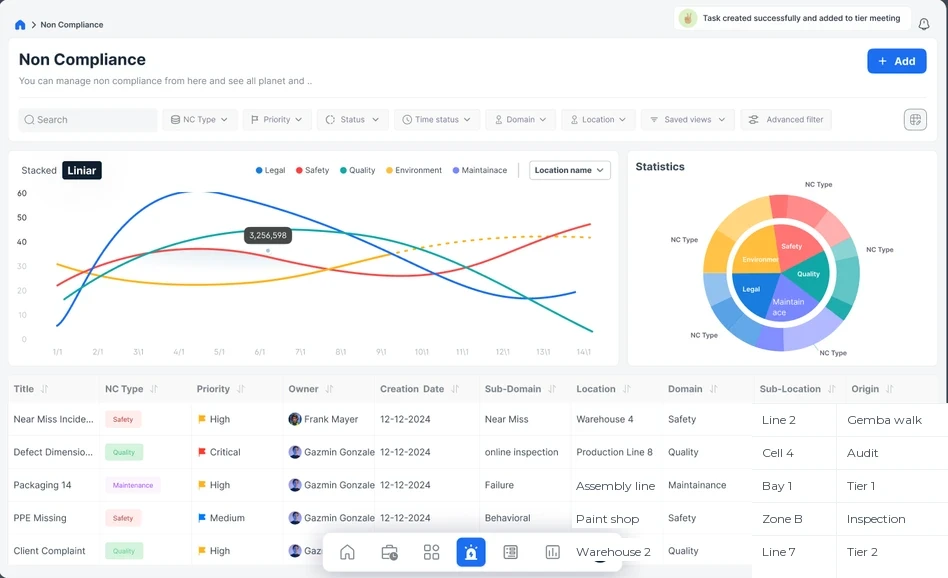
Live views of task completion rates, compliance scores, open issues, escalation status, and cross-plant comparisons — tailored to every role in the organization.

Built for Plant Managers and Directors who need to see operational performance as it happens, not as it is reported days later.


The Problem This Solves

By the Time You See the Problem,

It Has Already Escalated Leadership relies on verbal updates, weekly reports, and spreadsheets compiled after the fact. There is no real-time view of what is happening on the floor. Task backlogs grow unnoticed. Compliance scores decline over weeks before anyone flags it. Escalations happen informally, and by the time a problem reaches the right level, it has already caused downstream impact. The data exists — it is just not accessible when decisions need to be made.

The deeper issue is the gap between real-time indicators and lagging indicators. Most plants operate on lagging data — last week's OEE, last month's CAPA closure rate, last quarter's audit scores. By the time lagging data reveals a problem, the problem has already produced consequences. Real-time dashboards shift the operating model from reactive review to proactive intervention, surfacing leading indicators — task aging, escalation velocity, compliance trend direction — while there is still time to act.


seven construction workers standing on white field

Why This Matters

Research from McKinsey Digital indicates that manufacturers with real-time operational visibility reduce unplanned escalations by 30 to 50%. The reason is straightforward: when problems are visible early, they are addressed while they are small. A task that is two days overdue is a coaching conversation. A task that is two weeks overdue is a systemic failure. The difference between these outcomes is not effort or intent — it is visibility. Plants without real-time dashboards discover problems through their consequences. Plants with them discover problems through their precursors.

How It Works

Every Metric, Live, for Every Role

Real-Time Task Completion Rates

See how many tasks are open, in progress, overdue, and closed — updated continuously. No waiting for someone to compile a report. The numbers are always current. Task metrics are broken down by department, shift, priority level, and type — allowing managers to identify not just how many tasks are overdue, but where the bottlenecks are and whether specific categories (safety, quality, maintenance) are disproportionately affected.

Escalation Status

See which issues have been escalated, to whom, and how long they have been waiting for resolution. Escalations do not disappear into someone's inbox — they are visible to everyone who needs to know. The escalation view shows the path each issue has taken through the tier structure, making it possible to identify systemic escalation patterns — areas that consistently generate escalations, or tier levels where issues stall.

Role-Based Views

Floor supervisors see their team's performance. Plant managers see the full facility. Directors see the portfolio. Each role gets the view that matches their decision-making scope — from granular operational data to executive summaries. The views are not just filtered — they are designed for different decision types. A supervisor needs to know which tasks to follow up on today. A director needs to know which plants require attention this quarter.

Compliance Score Trending

Track audit and inspection scores over time. Identify whether compliance is improving, stable, or deteriorating. Spot downward trends before they become audit findings. Scores cascade from individual areas to department-level summaries to plant-wide composites, supporting KPI cascading from the floor to executive dashboards. When a compliance score drops below threshold, the dashboard highlights the specific forms and findings driving the decline.

OEE and KPI Connection

Dashboard metrics connect to broader operational KPIs including OEE components (Availability, Performance, Quality), safety incident rates, and CI initiative progress. The dashboard does not replace your OEE system — it contextualizes OEE data alongside the operational activities that drive it. When OEE drops, the dashboard shows the task backlog, compliance scores, and open issues that may be contributing factors.

Open Issue Tracker

A single view of all unresolved issues across the plant — non-conformances, CAPA items, escalated tasks, and flagged concerns. Prioritized by age, severity, and ownership. The tracker distinguishes between issues that are actively being worked and issues that are stalled, providing the clarity needed to intervene on the right items. Aging analysis shows how long each issue has been open, with color-coded thresholds that match your plant's response-time standards.

Multi-Plant Comparison

For organizations with multiple facilities, compare performance across plants on standardized metrics. Identify which plants lead in specific areas and where support is needed. Benchmarking is automatic when multiple facilities use the same EmpowerOps configuration, creating a transparent performance landscape without manual data consolidation.

Real-Time Task Completion Rates

See how many tasks are open, in progress, overdue, and closed — updated continuously. No waiting for someone to compile a report. The numbers are always current. Task metrics are broken down by department, shift, priority level, and type — allowing managers to identify not just how many tasks are overdue, but where the bottlenecks are and whether specific categories (safety, quality, maintenance) are disproportionately affected.

Compliance Score Trending

Track audit and inspection scores over time. Identify whether compliance is improving, stable, or deteriorating. Spot downward trends before they become audit findings. Scores cascade from individual areas to department-level summaries to plant-wide composites, supporting KPI cascading from the floor to executive dashboards. When a compliance score drops below threshold, the dashboard highlights the specific forms and findings driving the decline.

Open Issue Tracker

A single view of all unresolved issues across the plant — non-conformances, CAPA items, escalated tasks, and flagged concerns. Prioritized by age, severity, and ownership. The tracker distinguishes between issues that are actively being worked and issues that are stalled, providing the clarity needed to intervene on the right items. Aging analysis shows how long each issue has been open, with color-coded thresholds that match your plant's response-time standards.

Escalation Status

See which issues have been escalated, to whom, and how long they have been waiting for resolution. Escalations do not disappear into someone's inbox — they are visible to everyone who needs to know. The escalation view shows the path each issue has taken through the tier structure, making it possible to identify systemic escalation patterns — areas that consistently generate escalations, or tier levels where issues stall.

OEE and KPI Connection

Dashboard metrics connect to broader operational KPIs including OEE components (Availability, Performance, Quality), safety incident rates, and CI initiative progress. The dashboard does not replace your OEE system — it contextualizes OEE data alongside the operational activities that drive it. When OEE drops, the dashboard shows the task backlog, compliance scores, and open issues that may be contributing factors.

Multi-Plant Comparison

For organizations with multiple facilities, compare performance across plants on standardized metrics. Identify which plants lead in specific areas and where support is needed. Benchmarking is automatic when multiple facilities use the same EmpowerOps configuration, creating a transparent performance landscape without manual data consolidation.

Role-Based Views

Floor supervisors see their team's performance. Plant managers see the full facility. Directors see the portfolio. Each role gets the view that matches their decision-making scope — from granular operational data to executive summaries. The views are not just filtered — they are designed for different decision types. A supervisor needs to know which tasks to follow up on today. A director needs to know which plants require attention this quarter.

Real-Time Task Completion Rates

See how many tasks are open, in progress, overdue, and closed — updated continuously. No waiting for someone to compile a report. The numbers are always current. Task metrics are broken down by department, shift, priority level, and type — allowing managers to identify not just how many tasks are overdue, but where the bottlenecks are and whether specific categories (safety, quality, maintenance) are disproportionately affected.

Open Issue Tracker

A single view of all unresolved issues across the plant — non-conformances, CAPA items, escalated tasks, and flagged concerns. Prioritized by age, severity, and ownership. The tracker distinguishes between issues that are actively being worked and issues that are stalled, providing the clarity needed to intervene on the right items. Aging analysis shows how long each issue has been open, with color-coded thresholds that match your plant's response-time standards.

OEE and KPI Connection

Dashboard metrics connect to broader operational KPIs including OEE components (Availability, Performance, Quality), safety incident rates, and CI initiative progress. The dashboard does not replace your OEE system — it contextualizes OEE data alongside the operational activities that drive it. When OEE drops, the dashboard shows the task backlog, compliance scores, and open issues that may be contributing factors.

Role-Based Views

Floor supervisors see their team's performance. Plant managers see the full facility. Directors see the portfolio. Each role gets the view that matches their decision-making scope — from granular operational data to executive summaries. The views are not just filtered — they are designed for different decision types. A supervisor needs to know which tasks to follow up on today. A director needs to know which plants require attention this quarter.

Compliance Score Trending

Track audit and inspection scores over time. Identify whether compliance is improving, stable, or deteriorating. Spot downward trends before they become audit findings. Scores cascade from individual areas to department-level summaries to plant-wide composites, supporting KPI cascading from the floor to executive dashboards. When a compliance score drops below threshold, the dashboard highlights the specific forms and findings driving the decline.

Escalation Status

See which issues have been escalated, to whom, and how long they have been waiting for resolution. Escalations do not disappear into someone's inbox — they are visible to everyone who needs to know. The escalation view shows the path each issue has taken through the tier structure, making it possible to identify systemic escalation patterns — areas that consistently generate escalations, or tier levels where issues stall.

Multi-Plant Comparison

For organizations with multiple facilities, compare performance across plants on standardized metrics. Identify which plants lead in specific areas and where support is needed. Benchmarking is automatic when multiple facilities use the same EmpowerOps configuration, creating a transparent performance landscape without manual data consolidation.

What Changes When Leadership Can See the Floor in Real Time

Reduce response time to emerging issues by 50% or more

Problems are visible when they start, not when someone reports them. Early intervention prevents escalation. The shift from lagging to leading indicators means that management attention is directed at problems while they are still small and addressable.

Eliminate the weekly report compilation cycle

Data flows into dashboards automatically from Task Management, Forms, CAPA, and LSW Tracker. No one spends Friday afternoon building a PowerPoint. The time recovered — often 4 to 8 hours per week across the management team — is redirected to floor presence and improvement work.

Make data-driven decisions at every tier

From shift leads to directors, every role has access to the metrics that matter for their scope. Decisions are based on current data, not last week's numbers. Tier meeting discussions start with live dashboard data rather than verbal updates, compressing meeting time and improving decision quality.

Benchmark and improve across facilities

Multi-plant comparison creates healthy transparency. Best practices from high-performing plants become visible and transferable. Performance gaps are identified through data rather than anecdote, enabling targeted support rather than broad-brush initiatives.

Expected Outcomes:

In early deployments, plants report a 40-60% reduction in the time between issue emergence and management awareness.

Weekly report compilation effort has been eliminated entirely in plants using role-based dashboards, recovering an average of 6 hours per week of management time.

Multi-plant organizations report improved consistency in operational metrics as cross-plant visibility creates natural accountability and knowledge sharing.
Related Modules & Pages

Related Use Cases

See EmpowerOps in Action

See how Dashboards give you real-time visibility into your entire operation. We will show you role-based views from the floor to the boardroom — built from live data — and demonstrate how leading indicators replace lagging reports in your daily management system.